
Free Museum Images: 8 Open Access Collections and Their Licenses
Where to download free, high-resolution public-domain art from The Met, the National Gallery of Art, the Rijksmuseum, and five more museums, licenses compared.
The best free copy of a famous painting is usually on the website of the museum that owns it. Many large museums now release photographs of their public-domain works under CC0, which lets anyone download, print, edit, and even sell them without asking. An image search can turn up the same picture, but only the museum's object page tells you who painted it, when, where it hangs, and what you are allowed to do with the file. That last part varies more than most people expect, so read the label before you use the image.
The short answer: start at the museum that owns the painting
For high-resolution public-domain paintings you can use freely, begin with these collections:
- The Met for range: over 492,000 public-domain images from many periods and regions
- The National Gallery of Art in Washington for European and American painting
- The Art Institute of Chicago and the Cleveland Museum of Art for strong painting collections and simple downloads
- Getty for paintings, illuminated manuscripts, and early photographs
- The Rijksmuseum for Dutch art, with large files and a credit request
- The Smithsonian and Paris Musées for collections that reach well beyond painting
Each of these marks which of its images you may reuse, and all but one release them under CC0. Before you rely on any of them, check the specific object page. A museum's open access policy covers images it has cleared, not everything it shows.
If you want a painting mainly for your desktop, where to find Mac wallpapers compares museum files with other wallpaper sources by their real pixel size.
Free to download is not the same as free to reuse
A museum website can show you a painting, and even offer a download button, without letting you reuse the image however you like. The difference is written in its terms.
The National Gallery of Art makes the point in two places. Its general terms of use say that site content, images included, is for personal, educational, non-commercial use unless the site expressly provides otherwise. Its Open Access Policy is that express exception: images of works it believes to be in the public domain are released under CC0 and are free for any use, commercial or not.
Other famous collections stop short of open access. The National Gallery in London makes certain images available for download for non-commercial purposes under a Creative Commons BY-NC-ND 4.0 license, and asks commercial users to contact its picture library. The Mauritshuis in The Hague lets you download high-resolution images for non-commercial use, such as study, teaching, personal blogs, and social media, with the credit line "Mauritshuis, The Hague," and handles commercial requests separately.
At the Smithsonian, open access items carry a CC0 designation, while items marked "usage conditions apply" are limited to personal, educational, and other non-commercial uses.
CC0, the Public Domain Mark, and what “public domain” means
These labels sound alike but do different jobs.
Public domain describes the artwork. A painting is in the public domain when copyright no longer protects it, usually because its term has expired. The Met's FAQ adds that other rights, such as trademarks or the rights of privacy and publicity, can still apply to a public-domain work.
CC0 is a legal tool. Creative Commons describes it as a way for creators and rights holders to waive all copyright and related rights, "no rights reserved." Museums apply it to their photographs of public-domain works, so that any rights they might claim in the photograph are given up as well. Getty's FAQ is explicit about this: the works are in the public domain in the United States, Getty may have a copyright interest in the digital image, and it releases that interest under CC0.
The Public Domain Mark is a label, not a legal tool, in Creative Commons' own words. It tells you that a work is free of known copyright restrictions. The Rijksmuseum uses it: object pages such as The Night Watch list the copyright as "Public domain" and link to the mark.
In the European Union, Article 14 of the 2019 copyright directive requires member states to provide that a reproduction of a public-domain work of visual art is not protected unless the reproduction is itself original. In the EU, then, a faithful photograph of an old painting should not create a new copyright of its own. Outside the EU the rules vary, and the museum's label on the image remains the clearest answer.
One more detail: the image and the text on the same page may carry different terms. Getty's online collection pages, for example, put their text under a Creative Commons Attribution 4.0 license and state that images and other media are excluded from it.
Eight open access collections compared
The figures below are each museum's own, checked on its website on November 1, 2026. They grow as new photography is added, so treat them as orders of magnitude rather than counts.
| Collection | License on the image | Scale (museum's own figure) | Credit |
|---|---|---|---|
| The Met, New York | CC0 | Over 492,000 images of public-domain works | Not required; a citation is welcome |
| National Gallery of Art, Washington | CC0 | More than 60,000 images | Suggested: Courtesy National Gallery of Art, Washington |
| Art Institute of Chicago | CC0 | Over 50,000 images | A credit line is requested |
| Cleveland Museum of Art | CC0 | More than half the collection, updated each January | Not required; a citation format is provided |
| Getty, Los Angeles | CC0 | Over 160,000 images from the museum and research collections | Requested: Digital image courtesy of Getty's Open Content Program |
| Smithsonian Institution | CC0, except items marked usage conditions apply | More than 5.2 million 2D and 3D items, art among many other things | Not required |
| Rijksmuseum, Amsterdam | Public Domain Mark | Most, not all, works; JPEGs averaging 4,500 × 4,500 pixels | Requested: Rijksmuseum, Amsterdam |
| Paris Musées | CC0 | 150,000 reproductions at the January 2020 launch | A good-practice charter asks you to cite the source |
A large number is not the same as many paintings. The Smithsonian's 5.2 million items cover its museums, archives, libraries, research centers, and the National Zoo, so its Open Access highlights put The Death of Cleopatra and the Lansdowne portrait of George Washington next to the Apollo 11 command module. Getty's total includes more than 78,000 images from its Research Institute, much of it prints, maps, and archival photographs.
The Met, the National Gallery of Art, Chicago, and Cleveland
The Met
The Met introduced its Open Access Initiative in February 2017 and now offers over 492,000 images of public-domain works, with basic data on its collection, under CC0. Look for the OA icon at the lower left of an image on the object page, then use the download icon at the lower right. Credit is not required, but the museum hopes for a citation such as "The Metropolitan Museum of Art, New York" followed by the credit line from the object page. Do not use its trademarks or imply its endorsement.
National Gallery of Art, Washington
More than 60,000 images can be downloaded from object pages, free for any use under CC0. No permission request is needed. The gallery encourages the credit "Courtesy National Gallery of Art, Washington" and says users may not suggest that it endorses their projects.
Art Institute of Chicago
Chicago offers over 50,000 public-domain images under CC0. A download button appears on an artwork page only when the image is released; if there is no button, assume the work is still restricted. The museum also publishes a public API for working with its collection data in bulk.
Cleveland Museum of Art
Cleveland launched open access in January 2019 and now covers more than half of its collection, refreshed every January as more works enter the public domain. Filter the online collection for open access and use the download button on the artwork page. Its API needs no key and lists three versions of each CC0 image: a web JPEG of about 900 pixels on the long side, a print JPEG of 3,400 pixels, and a full-size TIFF. Credit is not required. Art4 takes hundreds of its paintings directly from these CC0 files.
Getty and the Smithsonian
Getty
Getty's Open Content Program has released over 160,000 images since 2013: more than 86,000 from the Getty Museum, from Greek and Roman antiquities to paintings and nineteenth-century photographs, and more than 78,000 from the Getty Research Institute. On a museum object page, click Download image, or use the arrow beside it to pick a size. Getty says its Large and Highest Resolution files are good enough for print. It asks for the credit "Digital image courtesy of Getty's Open Content Program."
Smithsonian
Smithsonian Open Access covers more than 5.2 million 2D and 3D items under CC0, with no attribution, permission, or fee required for commercial use. Because the program spans science and history as well as art, narrow your search to art before browsing, and check each result for the CC0 designation rather than "usage conditions apply."
Rijksmuseum and Paris Musées
Rijksmuseum
Images of most, though not all, works in the Rijksmuseum can be downloaded free from each work's page as JPEGs averaging 4,500 × 4,500 pixels. For professional use you can request free high-resolution TIFF files with a color reference. The museum asks you to credit "Rijksmuseum, Amsterdam" and says it keeps upgrading its files, so download a fresh copy rather than reusing an old one.
Paris Musées
Paris Musées, which runs the City of Paris museums, began releasing 150,000 high-definition reproductions under CC0 in January 2020, starting with two-dimensional works out of copyright. Its announcement names painters such as Courbet, Delacroix, Rembrandt, and Van Dyck, and photographers including Atget and Marville. Each download includes the image, a sheet of information about the work, and a good-practice charter that asks you to cite the source. The announced file size, 300 dpi and 3,000 pixels, is smaller than Cleveland's print JPEG or the Rijksmuseum's average file, so check it against your use.
How to find and download the right file
- Identify the owner first. Search for the title and the artist, and note which museum holds the painting. Copies on other sites may be cropped, recolored, or smaller, and they rarely carry the museum's rights label.
- Read the label on the object page. Look for the OA icon at The Met, a CC0 icon at Cleveland or Getty, the download button at Chicago, or "Public domain" under Copyright at the Rijksmuseum. No label and no button means you should treat the image as restricted.
- Download from the museum, at the size you need. Use the museum's own button. Several offer more than one size; pick the largest you will actually use.
- Check the file straight away. The Met advises users to assess an image immediately after downloading it, especially for print. Open it in Preview and look at the pixel dimensions before you build anything on it.
- Save the details with the file. Record them while the object page is still open. The last section shows a template.
Cleveland also notes that its CC0 images and data are available through Wikimedia Commons and Wikidata. Those copies are convenient, but the museum page is still where you confirm the license and find the largest file.
Which file size you need
The Met's guidance makes the key distinction: for print, resolution and the printed size matter; for screens, only the pixel dimensions decide how large an image can be shown. A small preview stretched to fill a large screen will not regain the brushwork it never contained.
| Use | Target | Note |
|---|---|---|
| Web article or slide | About 1,600 to 2,400 pixels on the long side | Larger files slow the page without adding visible detail |
| Mac wallpaper | At least the screen in pixels: 3,024 × 1,964 on a 14-inch MacBook Pro, 5,120 × 2,880 on a 5K display | Check the shape too; Fill Screen crops whatever does not fit |
| Inches × 300: about 2,550 × 3,300 pixels for a full US Letter page | The Met's print guidance works from 150 and 300 ppi | |
| Close study | The largest file the museum offers | Cleveland's full-size TIFF or a Rijksmuseum TIFF on request |
For a Mac wallpaper, size and shape both matter. A wide landscape painting can fill a MacBook almost completely, while a tall portrait loses much of its height to the crop. Compare the museum's figures with your screen: Paris Musées' announced 3,000 pixels falls just short of the 3,024-pixel width of a 14-inch MacBook Pro, Cleveland's print JPEG at 3,400 pixels on its long side is wider, and no single figure guarantees a 5K display. The MacBook wallpaper resolution guide explains how to read a file's pixels against your screen and its crop.
Museum paintings on your Mac, without the file work
Art4 gathers thousands of public-domain paintings from museum and open collections, notes the museum that holds each one, and sets it as your Mac wallpaper, with a new work every day if you like.
Keep the details with the image
The point of using a museum's file is that it comes with facts: artist, title, date, medium, dimensions, accession number, and credit line. Copy them while the object page is open, together with the license and the date you checked. A folder of unnamed JPEGs is easy to fill and impossible to trace a few months later.
Example record
Vincent van Gogh, Wheat Field with Cypresses, 1889, oil on canvas, 73.2 × 93.4 cm. The Metropolitan Museum of Art, New York, Purchase, The Annenberg Foundation Gift, 1993 (1993.132). Open Access, CC0. metmuseum.org/art/collection/search/436535. Checked November 1, 2026.
Even when credit is optional, as at The Met, Cleveland, and the Smithsonian, a short caption helps readers find the original and costs you one line. Where a museum asks for a specific credit, as the National Gallery of Art, Getty, and the Rijksmuseum do, use its wording.
Quick answers
Are museum open access images free for commercial use?
Images released under CC0 are. The Met, the National Gallery of Art, the Art Institute of Chicago, Cleveland, Getty, the Smithsonian, and Paris Musées all allow commercial use of those images. Other rights, such as trademarks or the privacy of people shown, can still apply, and museums ask that you not suggest they endorse your work.
What is the difference between CC0 and public domain?
Public domain describes a work that copyright no longer protects. CC0 is a legal tool a rights holder uses to waive whatever rights they may have, such as rights in a photograph of a painting. The Public Domain Mark is only a label saying a work is free of known copyright.
Can I use a museum image as my desktop wallpaper?
Yes. Even images a museum offers only for personal or non-commercial use, like those from the National Gallery in London, generally cover a wallpaper on your own screen. The license matters once the picture leaves your desktop, in a video, a product, or an edited version you share.
Sources
- The Met: Open Access
- The Met: Frequently Asked Questions, Image and Data Resources
- National Gallery of Art: Terms and Notices, including the Open Access Policy
- National Gallery of Art: Free Images and Open Access
- Art Institute of Chicago: Open Access Images
- Cleveland Museum of Art: Open Access
- Cleveland Museum of Art: Open Access API documentation
- Getty: Open Content Program
- Getty: Open Content Program FAQs
- Smithsonian: Open Access FAQ
- Rijksmuseum: Image requests
- Paris Musées: Open content, 150,000 works freely available
- National Gallery, London: Terms of use
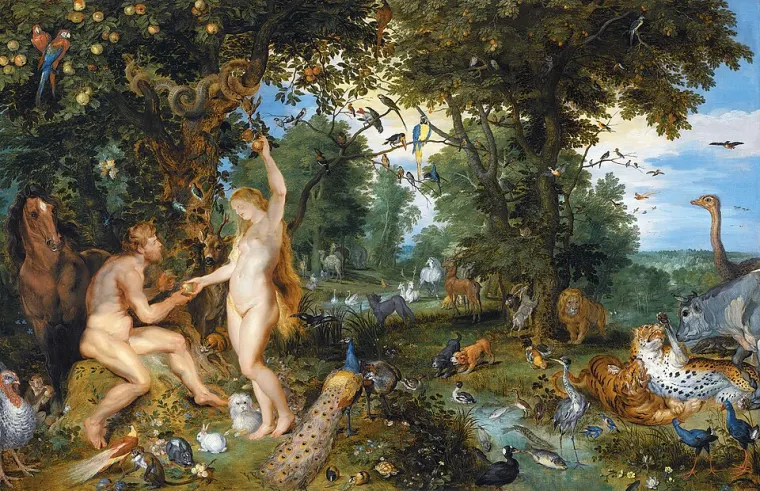
- Mauritshuis: The Garden of Eden with the Fall of Man, with image use terms
- Creative Commons: CC0
- Creative Commons: Public Domain Mark
- Directive (EU) 2019/790, Article 14: Works of visual art in the public domain
- Getty Museum Collection: object page with its content and usage rights note
- Smithsonian: Smithsonian Open Access
- Rijksmuseum: The Night Watch collection entry
Keep a painting like this on your Mac
Art4 lets you browse public-domain paintings by artist, movement, color, and screen shape, read the story behind each one, and set it as your wallpaper, or let it rotate on its own. Try it free for 7 days; if you keep it, it’s a one-time $14. Requires macOS 14 or later, or Windows 10 or later.